Five tabs. One wall.
CellarLume has one shape everywhere — Wines · Wall · Lights · Journal · Settings — identical on your phone and on the wall’s own web app. Nothing on this page is a roadmap item; it all runs on the reference wall today.
The living inventory
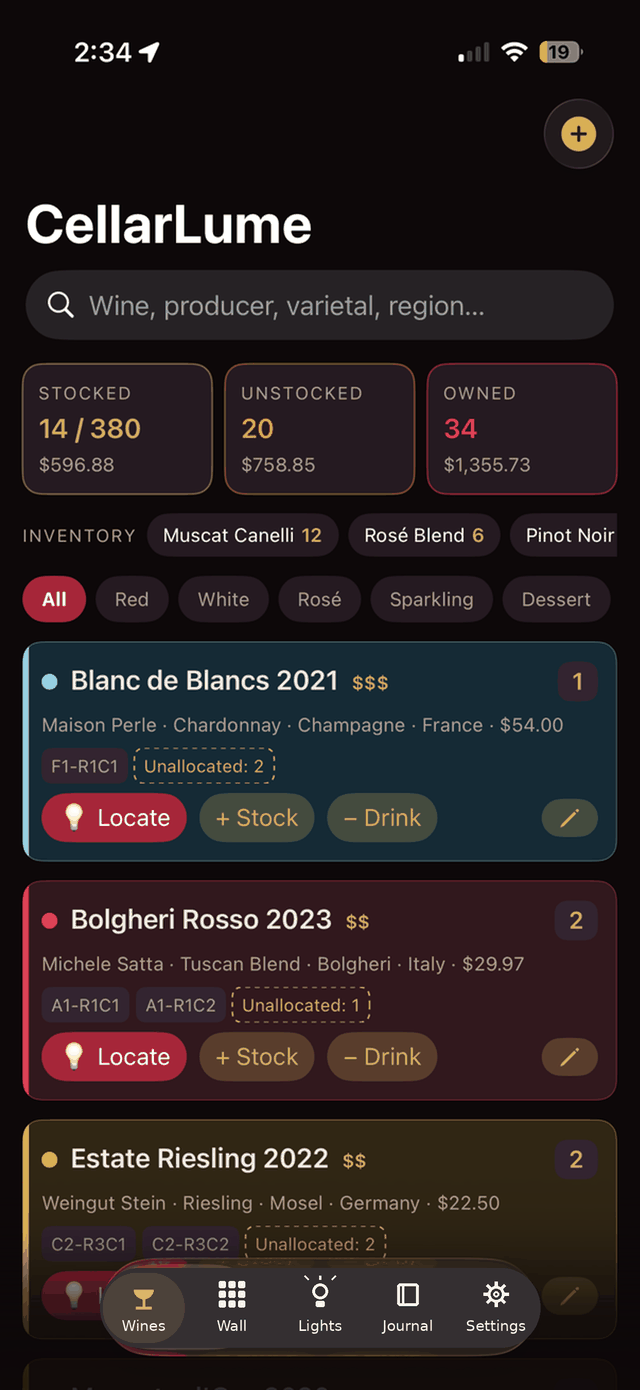
Not a spreadsheet with a wine theme — a catalog where every filter can reach out and touch the physical wall.
- Search everything
- Name, producer, varietal, region, country, vintage — one search box across all of it.
- Stat cards are filters
- Stocked (with current cellar value), Unstocked, and Owned aren’t just numbers — tap one and the list filters to match.
- Chips that light the wall
- Bottle counts by varietal, colour chips, food-pairing chips. Tapping a chip filters the list — and paints those bottles on the physical wall in that varietal’s palette.
- Light filters mode
- Flip it on and the wall mirrors your current filter live. Narrow the list, narrow the light.
- Drink-window badges
- Every wine wears its status — Hold, Now, Soon, or Past — and a ⏰ Drink-next filter sorts by closing windows.
- Locate · Stock · Drink
- Three actions on every bottle. Locate lights its slot. Stock places it by tapping the wall map. Drink sends a comet animation racing to the slot, and the light gives a farewell flicker.
- No ghosts
- Only bottles you actually have appear here. Drunk-dry wines retire gracefully to the Journal — notes, rating, and history intact.
The map
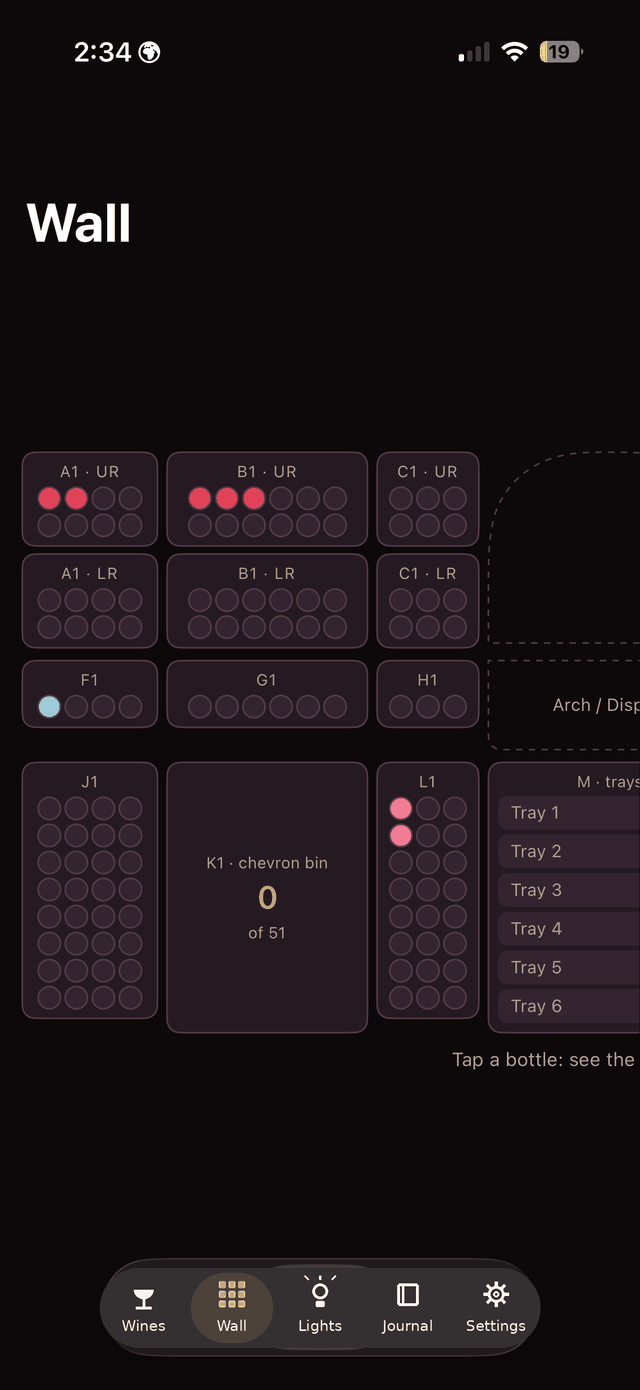
A live schematic of your actual wall — every section, arch, bin, and tray — not a generic grid.
- Drawn to your layout
- The reference wall is 13 sections, 380 slots — standard racks, an arch, a chevron bin, case trays. The map shows yours, whatever shape it is.
- Pulses in sync
- Slots pulse on the map in time with the physical LEDs. What the wall does, the map does.
- Stocking mode
- Pick a wine, tap its slot on the map, done. The fastest way to shelve without NFC tags.
- Tap to inspect
- Tap any slot to see what’s in it, drink from it, or move the bottle back to the unallocated pool.
The show
Every effect runs in firmware at about 40 frames a second — the app just names a preset and the wall performs it. All effects switch themselves off after three minutes.
- Paint by colour, varietal, or country
- Each with its own palette. Countries get a waving-flag effect in their national colours — France ripples in bleu-blanc-rouge.
- Champagne fade
- Sparkling wines get their own effect: a slow golden effervescence.
- Drink-window heat map
- The whole cellar triaged in light: green drink-now, amber soon, red past peak, blue still sleeping.
- Wine roulette
- The wall spins, slows, and lands on tonight’s bottle. Arguments settled at 40 fps.
- Decant timer
- A slot counts down 15 to 120 minutes in light. Readable from across the room.
- Flight builder
- Light a tasting flight in pouring order, bottle by bottle.
- Ambient & showcase modes
- For entertaining: the rack becomes the best light fixture in the house.
- Empty-slot finder
- Restocking day: every open slot lights up so you know exactly where the new case goes.
- Rainbow wall test
- All 72 slot lights in one slow full-wall sweep — the two-second answer to “did every LED survive that rewire?”
Your cellar remembers every pour
No cellar app does this. Every bottle you have ever opened, with its full pedigree, the exact date and time, and which slot it came from.
- Drunk History
- Every pour ever, newest first — producer, varietal, region, country, price, date, time, slot. Paged so a decade of drinking stays browsable.
- Rate it while you remember it
- Star ratings live right in the journal. Tonight’s opinion, recorded tonight.
- Shopping list on top
- One tap flags any wine to re-buy. The list sits at the head of the journal, ready for the wine shop.
- Nothing is forgotten
- Drunk-dry wines keep their notes, drink window, and rating here forever — one tap resurrects them to the shopping list.
Angeline Reserve Pinot Noir 2023 · Angeline Vineyards · Pinot Noir · Mendocino County · USA · $15.00
The machine room
The unglamorous half that makes the rest trustworthy.
- Pour announcements
- A webhook fires the instant a bottle is poured or located. In the reference install it drives a split-flap Vestaboard — within seconds, no polling.
- One-file backup & restore
- Catalog, journal, ratings, shopping flags, even your crest image — the entire cellar in one file. Clone it onto a spare board in a minute.
- Make it yours
- Upload a family crest or logo and the app wears it in the header.
- Wall reconcile & section tests
- Light one rack section at a time to calibrate the slot map until every column answers to its name. Plus LED brightness control.
- In-app licence activation
- Kit boards activate right here — no separate portal, no web form.
- Health log
- Boot history, Wi-Fi signal, uptime — and it survives reboots, so you can see what happened while you were away.
- Updates over Wi-Fi
- New firmware arrives over the air. The ladder stays in the garage.
It talks to the rest of the house
The controller is a good citizen on a home network — plain local HTTP, webhooks, and open integration points. No cloud in any of these paths.
- Vestaboard
- Pours and locates appear on the split-flap board within seconds of the cork moving. Instant push, no polling, maximum theatre.
- Alexa
- “Alexa, turn on Cabernet” lights every Cab on the wall. It works through Hue emulation — no skill to install, no account to link.
- Home Assistant
- The same webhook and HTTP API the Vestaboard uses. If you run Home Assistant, the wall is one REST command away from everything else you automate.
- NFC tags on the racks
- Tap your phone to a tag and the bottle lights up. Arm a wine first and taps shelve a whole case, hands never touching the screen.
- iPhone app
- Native SwiftUI with full parity and a built-in demo mode. On TestFlight now — coming to the App Store.
- Installable web app
- The controller serves the same five tabs to any browser on the network. Add to Home Screen and it opens full-screen, safe-area aware, like it was always an app.
- No cloud, ever
- Everything above happens on your own network. The API is plain local HTTP; the fanciest ingredient is a webhook.
Want one on your wall?
The app is free and always will be. The controller kit and DIY licences are coming — leave an email and you’ll hear once, when there’s something to buy.